In development Windows · NVIDIA

One tray icon.
Five tools.
Zero overhead.

Chroma.GG watches which window has focus and applies your per-game display profile the instant you alt-tab in, then puts it back when you leave. Crosshair, performance HUD, app groups and instant replay all run inside the same 30 MB process.

Coming soon See it work
Event-driven, never polls ~0% CPU at idle No game hooking
Chroma.GG running over a live game
300msFocus debounce, so overlays never make your screen flicker
Up to120fpsRecording headroom at 50 Mbps, more than most rigs will ever ask for
6Colour axes: gamma, contrast, brightness, vibrance, temp, hue
0Polling loops, background timers or injected DLLs

Display profiles

Six colour axes per game, applied at the driver's output ramp the moment that window takes focus.

Crosshair overlay

Click-through, per-profile, with a favourites row. No code ever loaded into your game.

Performance HUD

FPS from RTSS plus CPU, RAM, GPU, VRAM and temps, anchored anywhere on screen.

Instant replay

A rolling GPU-encoded buffer, one hotkey to save, with library, player and trimmer built in.

Five tools that already live on your machine, minus four tray icons.

Everything below actually works. Drag the sliders, move the HUD, switch the crosshair. Same behaviour as the app, just running in a browser.

Your colours follow the game

Bind a profile to an .exe and Chroma.GG applies it the instant that window takes focus, then puts your desktop back exactly as it was when you tab out. No manual switching, no trips to the NVIDIA Control Panel.

  • Six colour axes. Gamma, contrast, brightness, digital vibrance, temperature and hue, saved per game.
  • Applied at display level. Written straight to the GPU's output ramp, so it shows up in your recordings and screenshots too. It isn't a translucent window sitting over the game.
  • Overlay-proof. A 300 ms debounce swallows the focus flicker Discord, Steam and RTSS overlays cause.
focus hook: SetWinEventHook · not a timer
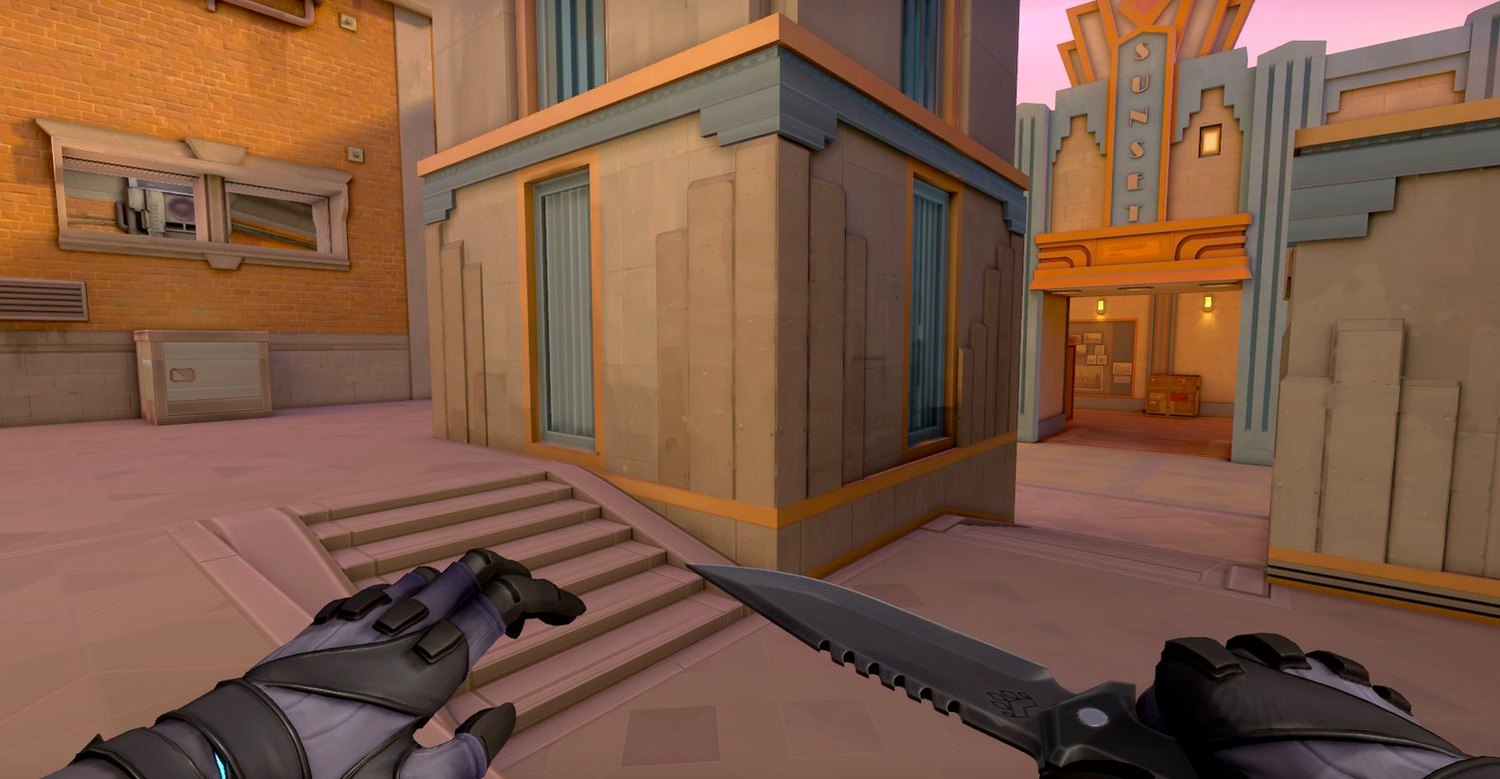
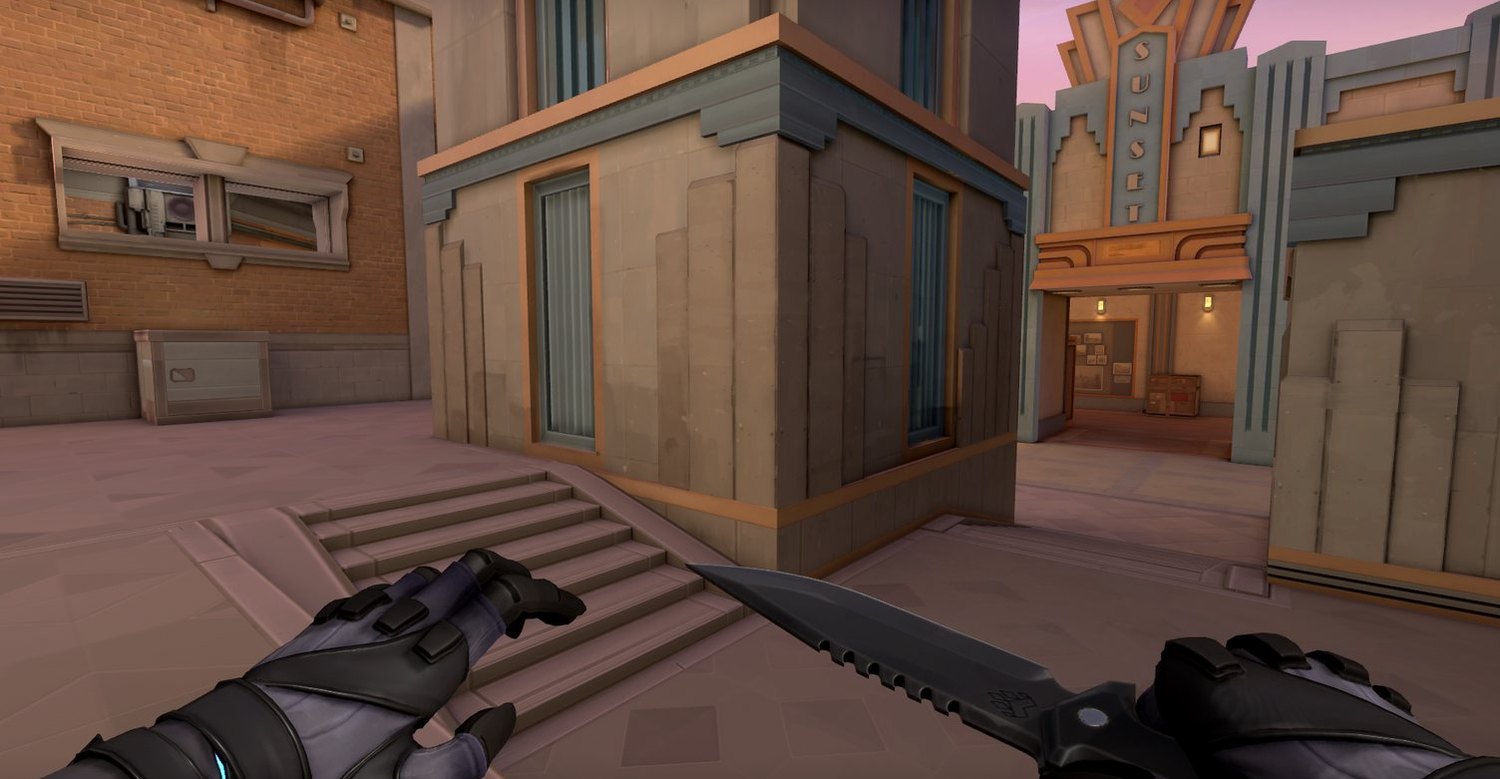
Game scene with a Chroma.GG profile applied
The same scene on default display settings
Default Chroma.GG

Drag to compare. Same monitor, same scene, profile on and off.

Everything launches together. Everything closes together.

Group up the apps you always open alongside a game: voice comms, stat trackers, music. Start the game, they start with it. Close the game, Chroma.GG shuts them down so nothing sits idle eating RAM for the rest of the day.

  • Per-companion launch delay so heavier apps don't fight the game for I/O on startup.
  • Steam and Epic library scanning plus an installed-apps index, so you pick from a list instead of hunting for .exe paths.
  • Close-together is optional per companion, because you don't always want your music to die with the match.
watcher: event-driven process lifecycle

Escape From Tarkov

Not running
Blitz.GGidle
OBS Studioidle
Spotifyidle
Launch, then close, to see what gets reclaimed

A rough demo of the group lifecycle. Real numbers depend on your own apps.

A crosshair that isn't the game's problem

A click-through overlay window drawn above the game, bound per profile so each title keeps its own shape. It never intercepts input, never touches the game process, and hides itself while you're aiming down sights if you want it to.

  • Custom shapes and colours, with a favourites row for switching between saved marks fast.
  • Hide while right-click is held, so it doesn't fight your scope.
  • No injection. It's an ordinary layered window. Chroma.GG never loads code into a game.
Read first: some anti-cheats flag overlays, so check a game's rules

Frame timing you can actually trust

FPS comes from RTSS's shared memory, the same engine MSI Afterburner and CapFrameX read. Anything that measures frames from outside the game sits downstream of the Windows compositor, which throttles frame delivery on mixed-refresh multi-monitor setups and quietly corrupts the number.

  • CPU, RAM, GPU, VRAM and GPU temp alongside FPS, with your actual hardware named.
  • Six anchor positions or free placement, single-line or stacked, matching your app theme.
  • Reader, not a hook. Chroma.GG reads RTSS's memory block, so it adds no injection surface of its own.
source: RTSS shared memory · in-process Present() timing
FPS |CPU 30%|RAM 45%|GPU 80%|GPU TEMP 64°C|VRAM 70%

Drag the HUD anywhere in the frame, same as in-game.

The last five minutes, always

A rolling buffer holds recent gameplay in memory at up to 120 fps and 50 Mbps. Hit the clip key and it lands on disk. DXGI Desktop Duplication grabs the frames, NVENC encodes them on the GPU, and your desktop, mic and per-app audio get muxed in.

  • Match display profile. Clips carry the same colour your screen had, instead of the flat raw capture.
  • Per-app audio. Pin Spotify or a browser and mix its track independently of desktop and mic.
  • Library, player and trimmer built in. Grouped by day and game, non-destructive in/out trimming, no external editor.
pipeline: DXGI → NVENC → MP4 · no capture border
F6
Clip savedHow to Fish · 1:59

A mock-up of the real thing: one keypress writes the buffer to disk and says so on screen.

Capture, browse, trim and share without leaving the window.

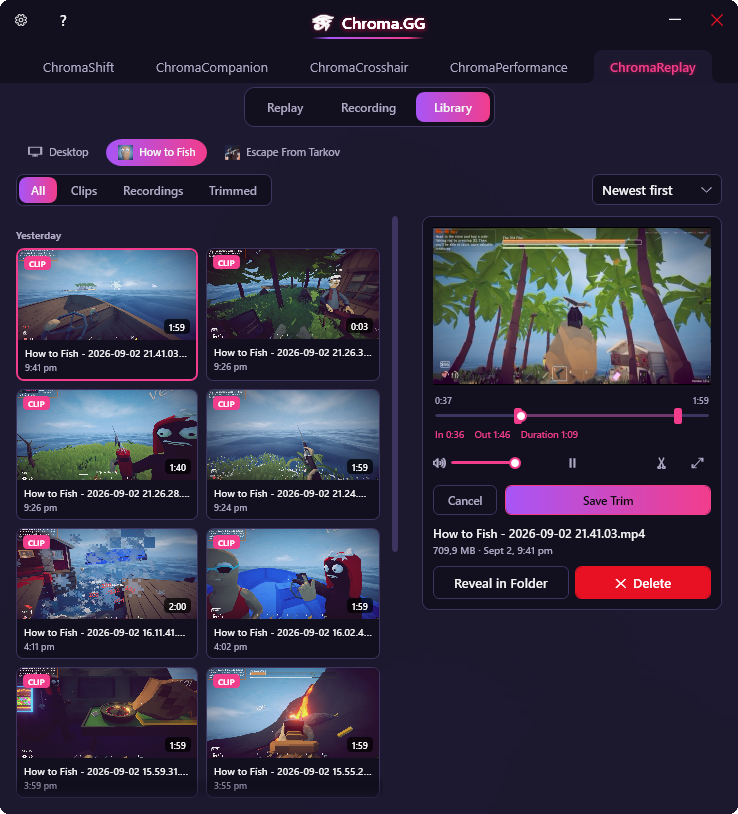
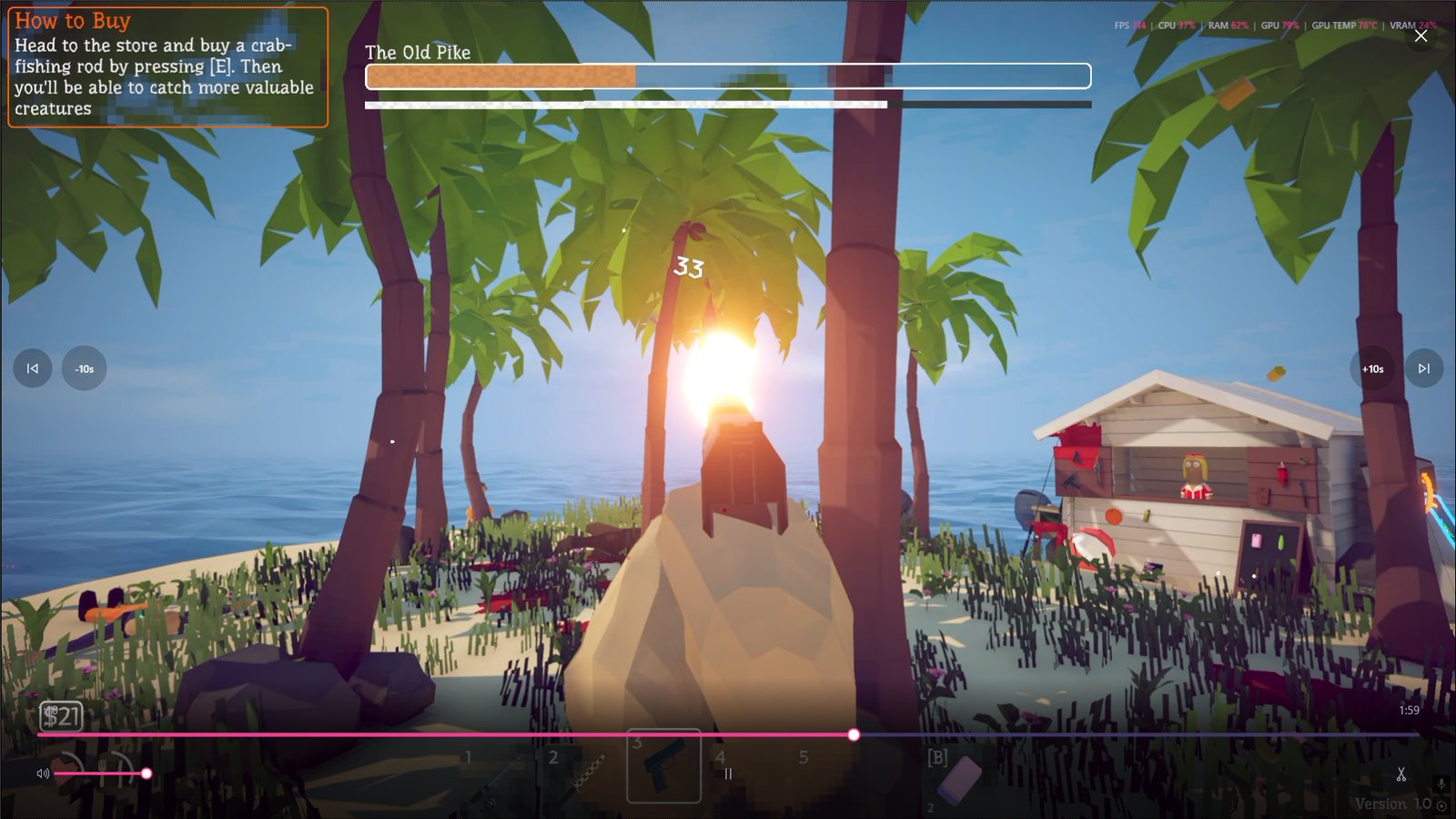
Clips are grouped by day and tagged by the game they came from. Select one and it plays inline. Scrub it, set in and out points, save a trimmed copy. They're ordinary MP4s on disk the whole time.

Chroma.GG Library tab showing clips grouped by day with an inline player and trim controls
  • Inline playback on a real GPU surface. Built on FlyleafLib after WPF's MediaElement and FFME both juddered. Full scrubbing, volume and fullscreen.
  • Non-destructive trim. Set in and out on the timeline, save a copy, keep the original.
  • Filter by game or type (clips, recordings, trimmed), sorted newest first.
  • Nothing is locked in. Reveal in folder opens plain MP4s you can drag anywhere.

Your music shouldn't end up in your clip.

Most tools hand you one flattened stereo track: the game, voice comms and whatever you had playing, all stuck together. Post that and you've published someone's album along with your clip.

Chroma.GG captures desktop audio, your microphone and each pinned app as separate WASAPI sources, then mixes them on its own clock. Pull Spotify to zero in the recording and you still hear it while you play. It just never reaches the clip.

  • Per-process capture. Windows exposes no managed API for isolating one app's audio, so this rides hand-written COM interop against the process-loopback interface.
  • Independent devices. Pick a different mic and output device than the rest of Windows uses, each with its own level.
  • Clock-locked. Sources are resampled and mixed against a QPC clock, so nothing drifts out of sync over a long recording.
pipeline: WASAPI → mixer → Media Foundation

Recording audio

Microphone100%
Microphone (HyperX QuadCast S)
Desktop audio100%
Speakers (High Definition Audio)

Per-app audio

DiscordPinned 85%
SpotifyPinned 100%
What lands in the clip Game audio + your voice + Discord + Spotify.

It runs on your machine and nowhere else.

No account, no launcher, no telemetry. Just a tray app that does five jobs and then stays out of your way.

Coming soon
Seven built-in themes

It's called Chroma for a reason.

Every surface in the app is themed from one resource dictionary, so a theme is a genuine re-skin: sliders, tabs, dialogs, the video player chrome, the in-game overlay.

Pick one to re-skin this page too.

Chroma.GG
ChromaShiftChromaCompanionChromaCrosshairChromaPerformanceChromaReplay
Gamma1,03
Contrast0,51
Brightness0,00
Digital Vibrance73
Advanced colour options
Save ProfileApply Now
Under the hood

Four decisions that made it work.

Chroma.GG is a .NET 8 WPF app, x64-only, with no MVVM framework and no DI container. These are the problems that actually shaped it.

Problem 01 · flicker

Overlays kept strobing the screen

Discord notifications, the Steam overlay and RTSS's OSD all steal foreground focus for a frame. Reacting to every focus event meant the display snapped back to the desktop profile and instantly returned. You would see it flash, several times a match.

Every focus change now passes through a single DispatcherTimer. Each event overwrites a pending profile and restarts a 300 ms countdown, so only a focus state that stays current ever reaches the display. A flick away and back never lands at all, and a real alt-tab still feels instant.

Problem 02 · no public API

NVIDIA doesn't expose those sliders

Digital Vibrance has a real, public NVAPI call. Gamma, contrast, brightness and hue don't. NVIDIA has confirmed on its own developer forum that the Control Panel's colour sliders sit behind a private, NDA-only API. No wrapper library can reach them.

So they don't go through NVAPI at all. Chroma.GG writes the Windows GDI gamma ramp directly, which is the same per-channel lookup table the driver ends up painting with. It's public, documented, works on any vendor's card, and it lands in captures too. It does have a real limit. Three independent channel curves can't do true hue rotation, so temperature and hue are scaled approximations.

Problem 03 · bad numbers

Measuring FPS from outside the game lies

ETW and DWM frame events sit downstream of the Windows compositor, which is documented to throttle a high-refresh display's frame delivery while a slower monitor is attached. That corrupts the reading on exactly the multi-monitor setups most PC players run.

RTSS avoids it by hooking Present() inside the game process, upstream of the compositor. Rather than reinvent that and take on an injection surface of its own, Chroma.GG reads RTSS's shared memory block. It's the same source Afterburner's OSD uses.

Problem 04 · capture cost

Recording that doesn't cost you frames

Capture runs on DXGI Desktop Duplication rather than Windows.Graphics.Capture, because it draws no capture-indicator border and needs no package identity grant. Frames stay on the GPU through HLSL colour-correction and cursor compositing, then go straight into NVENC.

Audio is a parallel WASAPI pipeline: desktop loopback, microphone and per-process capture, resampled and mixed against a QPC clock, then muxed to MP4 through Media Foundation.

What it needs, and what it does.

System requirements

Operating system
Windows 10 / 11 · x64
Graphics
NVIDIA GPU (NVAPI)
Runtime
.NET 8 Desktop
Replay encoding
NVENC-capable GPU
FPS readout
RTSS (auto-launched)
Admin rights
Not required

Capture & capability

Replay buffer
Up to 5 min · in memory
Frame rate
Up to 120 fps
Bitrate
Up to 50 Mbps
Container
MP4 / H.264
Audio sources
Desktop · mic · per-app
Monitors
Primary or all displays
.NET 8 · WPF NVAPI + GDI gamma ramp Event-driven, no polling DXGI Duplication + NVENC WASAPI + Media Foundation Direct3D 11 · HLSL shaders Runtime-loadable themes

Things worth asking before you install anything.

Is this safe to run with anti-cheat?

Chroma.GG never injects code into a game. Display profiles are written to the GPU's output ramp, focus is read through a standard Windows event hook, and FPS comes from RTSS's own shared memory rather than a hook of its own. That said, the crosshair overlay is a window drawn above the game, and some anti-cheats detect overlay windows while some games' rules treat any crosshair aid as unauthorised regardless of how it's drawn. The app tells you that right at the toggle instead of burying it in a EULA. Check a game's terms before you turn it on.

Why NVIDIA only?

Digital vibrance is applied through NVAPI, which ships as a 64-bit NVIDIA library, and replay encoding uses NVENC. The gamma, contrast and brightness path is vendor-neutral GDI, but the full feature set assumes an NVIDIA GPU today.

Will it cost me frames?

Idle cost is effectively nothing, because there's no polling loop anywhere in the app. Focus tracking is an OS callback that only fires when focus actually changes, hotkeys use RegisterHotKey, and theme reloads use a file watcher. Replay is the one genuinely expensive feature, and it runs on the GPU's dedicated encoder rather than your render budget.

Do my colour settings show up in clips and screenshots?

Yes, if you want them to. Because profiles are applied at display-output level, a raw capture would normally miss them, so "match display profile" re-applies your active gamma, contrast, brightness, vibrance and hue to captured frames, so a clip looks like what you were actually playing.

What state is it in?

Display profiles, companion groups, crosshair and the performance overlay are built and in daily use. ChromaReplay's interface, library, player and trimmer are complete and the capture pipeline is being wired up behind them. That's why this page says early access rather than download.

Who makes it?

Darren Robson, one developer. Chroma.GG started as a personal project built around things that annoyed me while playing. I write the codebase to be read, so every non-obvious decision carries a comment explaining why, including the ones I got wrong the first time.

Want it on your machine?

Chroma.GG is in active development and heading to Steam. Get in touch for a walkthrough of how it's built, or just to tell me what's missing.

Coming soon

Windows 10/11 · NVIDIA · no account required